What Smart Trade is
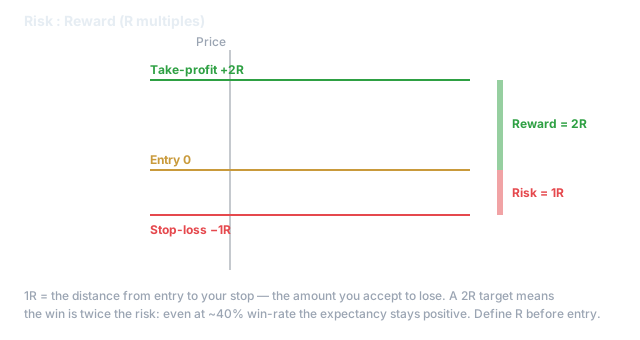
Smart Trade is the manual counterpart to automated systems: a pro terminal for placing one deliberate trade with full geometry visible before you commit. It is where you shape a single entry — with a stop, one or more take-profits, and a trailing exit — the way a desk trader would.
Shape the trade before you send it
- •Risk-based sizing — enter the percentage of balance you are willing to risk and the distance to your stop; the terminal derives the position size for you. You size from risk, not from a gut number.
- •Multiple take-profits — split the exit across levels so you bank partial profit and let the rest run.
- •Trailing stop — lock in gains as price moves your way.
- •Trade Preview & liquidation line — see the R:R, the geometry, and (on futures) where liquidation sits before you enter.
- •Templates — save a shape you trust and reuse it.
sizeUsd is notional — read this twice
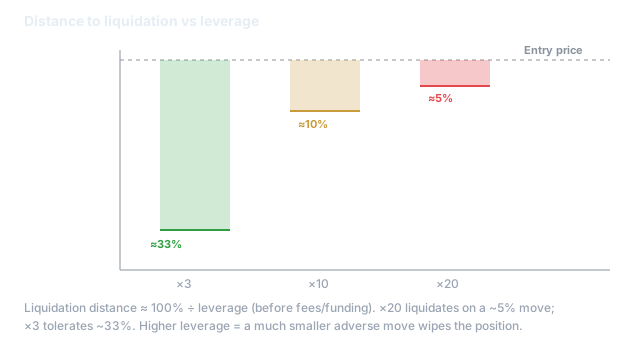
The size you enter is notional (position value), not margin (the collateral it uses). On 10× leverage a $1,000 notional position uses ~$100 of margin. Confusing the two is how traders accidentally take a position ten times bigger than they meant. The geometry shown is display-only — the exchange is the source of truth for fills and liquidation.
The pitfall
Two traps live here. First, notional vs. margin: always confirm the margin the position actually consumes, not just the notional. Second, a tight stop with high leverage puts your liquidation price closer than your stop — check the preview line, because if liquidation is nearer than your stop, the exchange closes you first. Size from risk, respect the liquidation line.
Next
For a hands-off version of the same discipline, build a system in the Composer; to keep your whole book safe, set the account Risk Engine limits.